Preparing a test
This page isn't usually needed for the group you picked under Viewing as. It's shown because you opened it directly.
Holter, ABP, Stress and MPI tests arrive as Pending Processing. Preparing a test means filling in the technologist’s details so a physician can review it.
Prepare a test from the list
Section titled “Prepare a test from the list”-
Open the test list, for example Holter, and select To Do.
-
Find a test with status Pending Processing.
-
Select Finish Prepare.
-
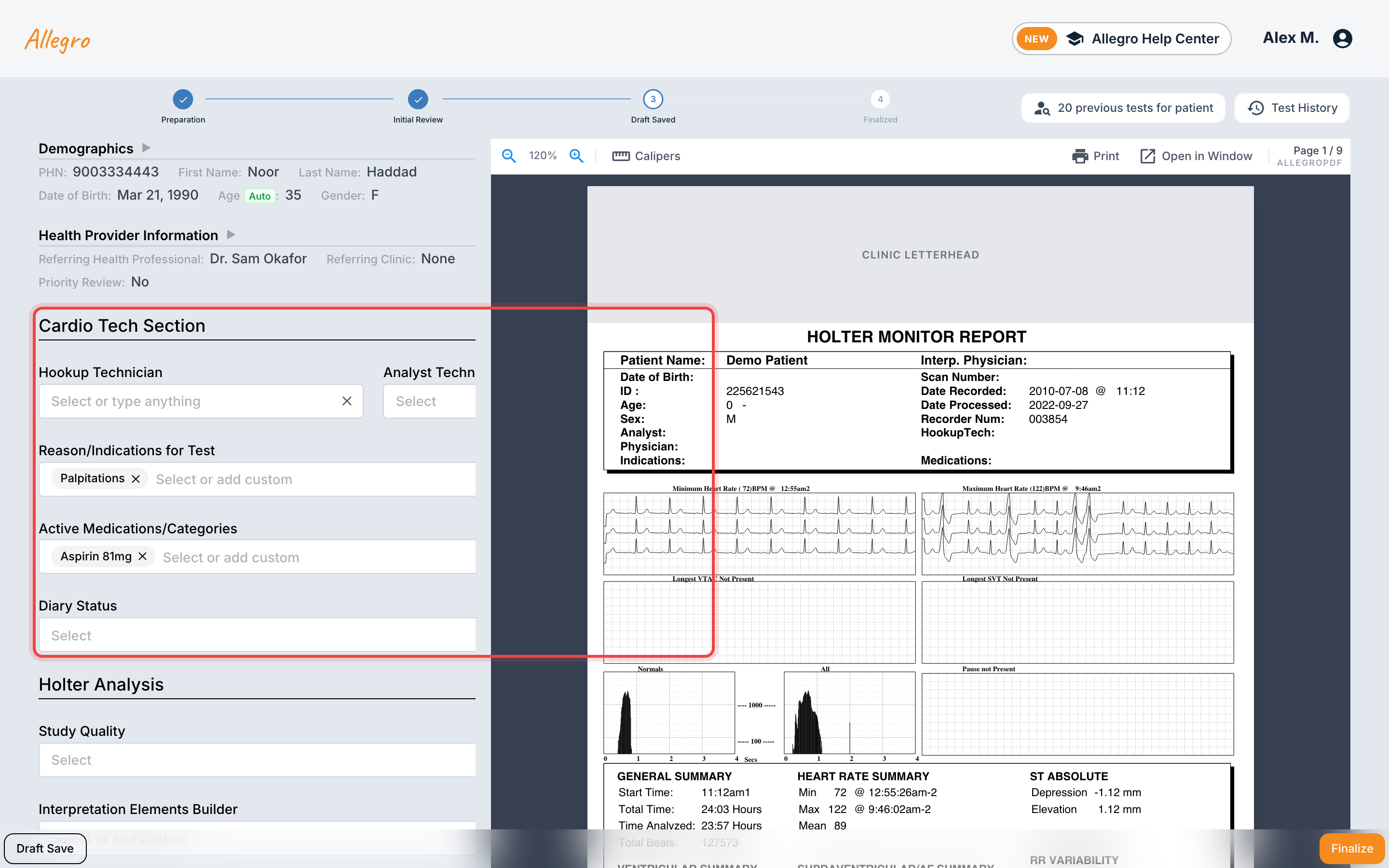
The preparation screen opens: the form is on the left and the device report on the right.
Fill in the form
Section titled “Fill in the form”-
Check Demographics. Confirm the patient’s PHN, name, date of birth and gender match the requisition. Fix anything that’s wrong.
-
Check Health Provider Information. Set the Referring Health Professional, the Referring Clinic and, if you know it, the Tasked Interp. MD (the physician who should review it). Tick Priority Review for urgent tests.
-
Fill in the technologist section. For a Holter (Cardio Tech Section) that’s:
- Hookup Technician and Analyst Technician
- Reason/Indications for Test: pick from the list or type your own
- Active Medications/Categories
- Diary Status
- Baseline ECG Performed (tick box)
-
Look over the report on the right. Use zoom and Calipers if you need to.
-
Select Finish Test Preparation at the bottom.
What happens next
Section titled “What happens next”- The status changes to Pending Review.
- If you chose a Tasked Interp. MD, the test goes to that physician’s MY TESTS. Otherwise it’s Unclaimed.
Preparing a Stress test from scratch
Section titled “Preparing a Stress test from scratch”On the home screen, under Prepare Tests, select Prepare Stress to start a new stress test.
Missing fields
Section titled “Missing fields”If something required is empty, Allegro shows “Some fields are missing or incomplete” and outlines the fields in red. Fill them in and try again.